How to Read Different Types of Electricity Meters: A Complete Step-by-Step Guide
Reading your electricity meter is one of the most practical skills a homeowner, renter, or small business operator can develop. Whether you want to verify the accuracy of your utility bill, track daily energy consumption, or simply understand what those dials and digits actually mean, knowing energy meter reading techniques puts you firmly in control of your energy costs. This guide covers every major meter type with clear diagrams and step-by-step instructions you can follow on your very first attempt.
Why Knowing How to Read Your Energy Meter Matters
Utility companies estimate consumption when a meter reader cannot access your property. Those estimates can diverge significantly from actual usage, sometimes resulting in bills that are hundreds of dollars off. A 2022 survey of residential customers found roughly 18 percent of households had received at least one estimated bill in the previous 12 months, and nearly a third required a correction after the customer submitted a real reading.
Beyond billing accuracy, regular meter readings allow you to:
Spot sudden consumption spikes that could signal a faulty appliance or electrical fault
Measure the real-world impact of efficiency upgrades such as LED lighting or insulation
Provide documented evidence if you dispute a bill
Understand time-of-use pricing and shift heavy loads to cheaper rate periods
None of this requires specialist tools or electrical training. You simply need to know what type of meter you have and how to interpret its display.
The Three Main Types of Electricity Meters
Before you can take a reading, you need to identify your meter type. Stand in front of the device and observe the display area. Most residential and light-commercial meters fall into one of three categories.
Dial (Analogue) Meter
Features a row of circular clock-face dials, each with a pointer. Common in homes built before the 1990s and requires the most interpretation effort.
Digital (Electronic) Meter
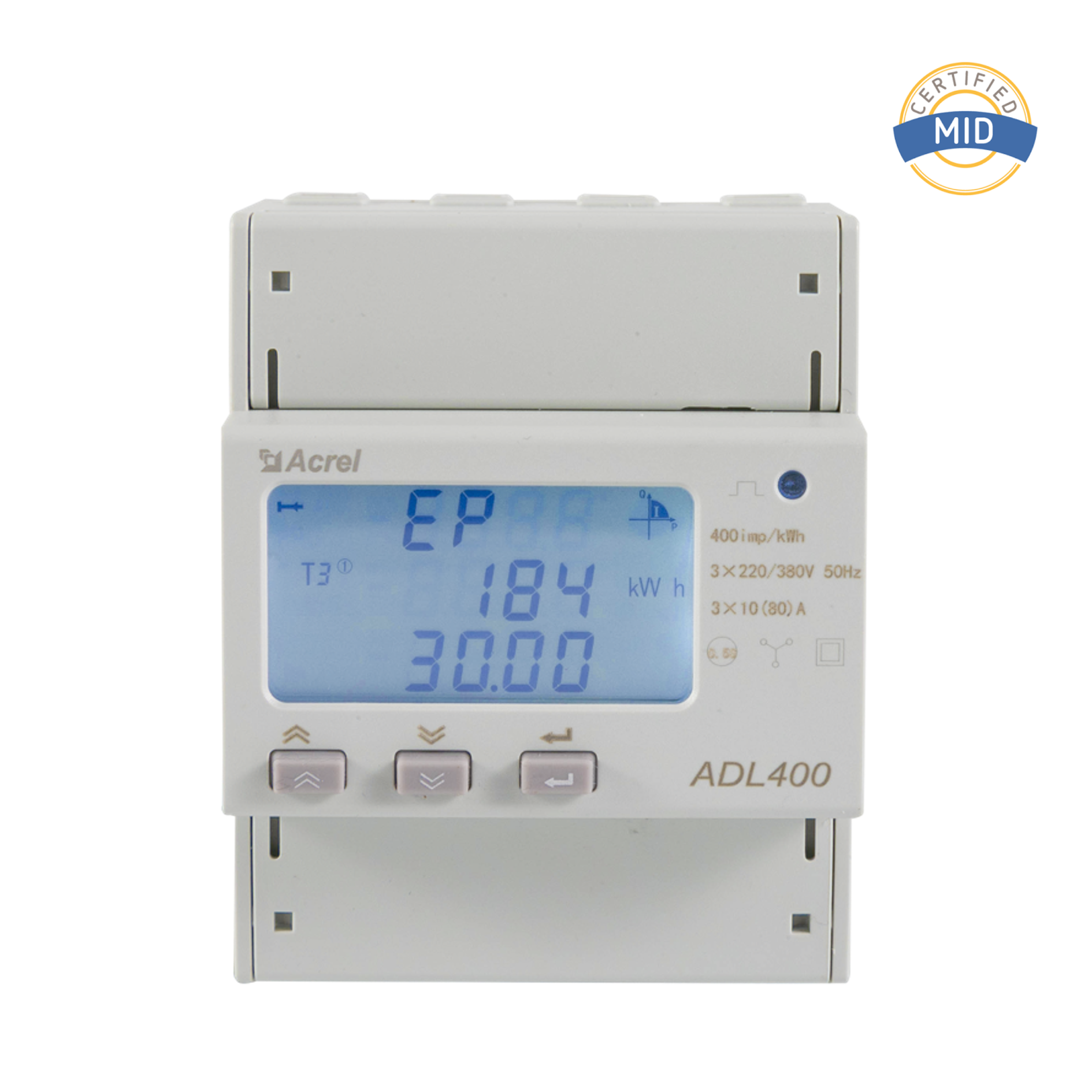
Displays kilowatt-hours on an LCD or LED numeric screen. Straightforward to read and the standard replacement for older analogue units.
Smart Meter
Communicates readings automatically to the utility via a wireless network and includes an in-home display unit for real-time monitoring.
A fourth variant, the prepayment meter, is common in rental properties. It functions like a digital meter but deducts credit as energy is consumed. Reading technique is identical to a standard digital meter.
How to Read a Dial (Analogue) Electricity Meter
Dial meters are the most misread type because alternate dials rotate in opposite directions. Follow these rules and you will get an accurate figure every time.
Step 1 - Identify the Dials and Their Direction
A standard dial meter has five dials labelled from left to right with multipliers of 10,000 kWh, 1,000 kWh, 100 kWh, 10 kWh, and 1 kWh. Look at the small arrow beside each dial face indicating the rotation direction. Adjacent dials nearly always rotate in opposite directions.
Step 2 - Read Each Dial from Left to Right
For each dial, record the number the pointer has most recently passed, not the number it is closest to. If the pointer sits directly on a digit, check the dial immediately to the right before recording.
Step 3 - Apply the Rules for Borderline Positions
Pointer exactly on a number and the next right-hand dial is between 0 and 9: record the number shown
Pointer exactly on a number and the next right-hand dial shows 9: record one less than the number shown
Pointer clearly between two numbers: always record the lower number
Step 4 - Ignore the Red Dial
Many older meters include a red dial marked in tenths. This is a test dial used by engineers and must not be included in your reading.
The five dials above yield a reading of 47305 kWh. To calculate consumption, subtract the previous recorded figure from this total.
How to Read a Digital Energy Meter
A digital energy meter reading is far more intuitive than its analogue predecessor. The display presents kilowatt-hours directly as a numeric string, eliminating pointer-interpretation. However, several display quirks can still cause confusion for first-time readers.
Single-Rate Digital Meters
The simplest case: one number on the screen representing total accumulated kilowatt-hours. The display typically shows five to eight digits with two decimal places. Record all digits to the left of the decimal point. Leading zeros are usually suppressed, so a display showing 00847.32 is recorded simply as 847.
Multi-Rate (Time-of-Use) Digital Meters
These meters store consumption on two or more registers corresponding to different pricing periods. The display cycles through each register automatically, or you may press a button labelled Display or Select to advance.
Rate 1 (Day): Records kWh used during peak hours, typically 07:00 to 00:00
Rate 2 (Night): Records kWh used during off-peak hours, typically 00:00 to 07:00
Your bill shows both figures separately; record each one when submitting a reading
Step-by-Step: Reading a Digital Energy Meter
Locate the meter and wait for the display to illuminate (some models sleep to save power)
Identify whether there is a single register or multiple registers cycling on screen
For each register, note the full numeric reading shown before the decimal point
Write down the register label (if shown) alongside each figure
Allow at least two full cycles to confirm you have captured every register
Record the date and time of the reading for your personal records
Common Display Codes on Digital Meters
Display Code
Meaning
Action Required
IMP or IMPORT
Energy consumed from grid
Record for billing
EXP or EXPORT
Energy returned to grid (solar)
Record if you have a feed-in tariff
R1 / R2 / T1 / T2
Rate or tariff register number
Record each separately
ERR or FAULT
Internal error state
Contact your utility provider
TEST or 88888
Self-test sequence at startup
Wait for normal reading to appear
How to Read a Smart Electricity Meter
Smart meters transmit readings automatically, eliminating estimated billing in most cases. However, knowing how to read the device directly remains valuable for verifying transmitted data, monitoring real-time consumption, and operating the meter if the communication link drops.
Reading the Meter Unit Itself
The meter unit installed on your wall operates like an advanced digital meter. Press the display button to cycle through screens. Look for the screen labelled IMPORT REGISTER or simply kWh. On most models this reading appears after one or two button presses from the default screen.
Using the In-Home Display (IHD)
Smart meter installations include a small wireless display unit you can keep anywhere in your home. This device typically shows:
Current power draw in watts or kilowatts, updated every few seconds
Daily, weekly, and monthly consumption totals in kWh and cost
A colour-coded indicator: green for low use, amber for moderate, red for high
Cumulative meter register matching the meter unit on the wall
For billing purposes, the figure that counts is the cumulative register on the meter unit itself, not the IHD cost estimate, which may use slightly rounded tariff rates.
Half-Hourly Data and Time-of-Use Tariffs
Second-generation smart meters can log consumption in 30-minute intervals. This enables time-of-use tariffs where electricity is cheaper at night or on weekends. Your utility portal will show a bar chart of half-hourly usage, helping you identify exactly which appliances or habits are driving your costs.
Mechanical Meter vs Digital Meter: Key Differences
Feature
Dial (Mechanical)
Digital Electronic
Smart Meter
Reading Method
Manual dial interpretation
Read LCD digits directly
Automatic + manual backup
Typical Accuracy
+/- 2 percent
+/- 1 percent
+/- 0.5 percent
Multi-Rate Support
Rare
Yes, via registers
Yes, with time-stamped data
Remote Reading
No
No
Yes
Consumer Data Access
Manual only
Manual only
Real-time via IHD or app
Typical Lifespan
30 to 40 years
15 to 20 years
10 to 15 years
Understanding Kilowatt-Hours and What Your Reading Means
Every meter type records energy in kilowatt-hours (kWh). One kilowatt-hour is the amount of energy used by a 1,000-watt device operating continuously for one hour. In everyday terms:
~1 kWh
Running a full-size dishwasher through one complete cycle
~1 kWh
Boiling a kettle approximately 8 to 10 times
~1 kWh
Operating a 50-inch LED television for around 6 hours
~1 kWh
Running 10 LED bulbs (10 W each) for 10 hours
Calculating Consumption Between Readings
Subtract the earlier reading from the later one to find how many kWh you have used. For example, if your reading on the first of the month was 14,230 and today it reads 14,618, you have consumed 388 kWh. Multiply this by your unit rate to get the cost before standing charges or taxes.
Checking Your Bill Against Your Reading
Your bill should state an opening and closing read. Compare the closing read on your bill to the reading you have taken. A discrepancy of more than one or two units likely means an estimated reading was used. Contact your supplier with your actual reading and they are obligated to issue a corrected bill in most regulated markets.
Complete Meter Reading Process Flow
Practical Tips for Accurate and Consistent Readings
Establish a Reading Schedule
Take readings on the same date each month, ideally the day before your billing period ends. This practice builds a consistent personal record that directly mirrors the billing cycle and makes discrepancies far easier to identify. Many people photograph the meter display with their phone, which automatically timestamps the image and provides evidence if a dispute arises.
Lighting and Visibility
Meters in cupboards or external boxes are often in poor lighting. Keep a torch or use your phone flashlight. Dials especially can be misread in dim conditions as pointer shadows become misleading.
Verify the Meter Serial Number
Your meter has a serial number printed on a label, usually starting with a two-letter prefix. Your utility bill will quote this number. Always verify it matches before submitting a reading, particularly in shared meter cupboards.
Watch for Counter Rollover
Older mechanical and some digital meters have a maximum display of 99,999 kWh. When the counter reaches this value it rolls back to zero. If your current reading appears dramatically lower than your previous reading, add 100,000 to the current reading before subtracting the previous figure.
Account for Seasonal Variation
Households in temperate climates typically use 25 to 40 percent more electricity in winter due to heating, lighting, and reduced solar generation. Always compare readings against the same month in the previous year rather than the immediately preceding month to avoid misreading seasonal changes as faults or tariff errors. Keeping a simple spreadsheet with monthly readings and dates makes this year-on-year comparison effortless and provides a clear picture of long-term consumption trends.
Troubleshooting Common Meter Reading Problems
Problem
Likely Cause
Solution
Display is blank
Sleep mode or faulty display
Press any button; contact utility if no response after 30 seconds
Reading lower than last month
Meter rollover or misread
Check if meter is near 99999; add 100000 if needed
Two numbers cycling on screen
Multi-rate meter with multiple registers
Record both with their labels (R1/R2)
Meter showing ERR or FAULT
Hardware fault or communication error
Report to utility provider; do not attempt repair
Dial pointer exactly on a number
Borderline position
Check next right-hand dial; if not past zero, record one less
Bill much higher than reading suggests
Wrong serial, estimated billing, or meter fault
Verify serial number matches bill; submit actual reading
Safety Guidelines When Accessing Your Electricity Meter
Meter reading is a non-invasive task that carries minimal risk when approached correctly. You are reading a display, not interacting with live components. Observe the following precautions:
Never open the meter casing, remove seals, or touch any wiring
If the meter is in an external box exposed to weather, ensure the box is dry before opening
If you notice burn marks, a burning smell, buzzing sounds, or physical damage, do not attempt a reading and contact your utility emergency line immediately
Children should not access meter cupboards unsupervised
You can also read about energy meter safety standards on product pages to understand what protections are built into modern metering equipment.
Frequently Asked Questions
Q1: How often should I submit a meter reading?
Most providers request readings at least quarterly. Monthly submission prevents estimated billing from accumulating. With a smart meter, automatic transmission removes the need for manual submission, but checking monthly is still useful for personal monitoring.
Q2: What does kWh stand for and why is it used for billing?
kWh stands for kilowatt-hour. It combines the rate of energy use in kilowatts and the duration in hours into a single figure representing the electrical energy delivered to your property. It aligns directly with how appliance power ratings appear on product labels.
Q3: Can I submit my own reading if the utility sends an official reader?
Yes, entirely legal and encouraged. Your own reading submitted via the utility's website, app, or phone line takes precedence over an estimate and is treated equally to a reading taken by the utility's own agent in most regulated markets.
Q4: My dial meter has six dials. Which ones do I read?
Read only the five black or white dials from left to right. The sixth dial, almost always red and at the far right, is an engineer test dial recording tenths of a kilowatt-hour. It is never included in customer readings or billing.
Q5: How do I check if my meter is running fast?
Note the reading, switch off all circuits except one 1,000-watt appliance, run it for exactly one hour, then take a second reading. The difference should be close to 1 kWh. A result above 1.05 kWh warrants a formal accuracy test, which utilities are generally required to perform free of charge.
Q6: What is the difference between a meter reading and consumption?
A reading is the cumulative kWh total on the display at a point in time. Consumption is the difference between two readings. Your bill charges for consumption, not the absolute reading value.
Q7: Can I read a smart meter manually if transmission fails?
Yes. Press the display button to cycle through screens, find the import register in kWh, and record that figure. Submit it to your utility as you would for a standard digital meter. Most utilities have a dedicated contact line for manual smart meter submissions during outages.


 English
 Deutsch


 Email: [email protected]
 Phone: +86-18702106858 / +86-21-69156352




